Showing posts with label facebook. Show all posts

Saturday, February 12

Facebook Live Commenting [New Features]

Facebook live commentingWe spend time on Facebook to check out what our friends are doing. Watching photos and commenting on them. Things get interesting when people suddenly start commenting in large group, but what the hell, I need to refresh my page to see what the new comment is and wait for page reloads.

A terrible mess!

Facebook Engineering team is rolling out a new feature called Live Commenting It's like chatting on your instant messenger, no more page reloads. Just comment auto-loads behind the scenes.

When someone comments on your post or photo, the comments start loading automatically, without any page refresh! This is the magic of Javascript technology AJAX.

To achieve this the facebook team has tested, many  technology approaches like:

  • Pushing vs. Polling Data
  • Write Locally, Read Globally

To understand the details of these processes, you can visit Facebook's Engineering team page.

Sunday, February 6

Remove Facebook apps and/or enhancing your privacy settings

I used about 135 apps some time in past. Currently I use only 15 of those apps. That translates to free access to my private data (photos etc) for 120 unnecessary apps! Mind you some of these apps were also spammy.

Some applications on Facebook platform have access to your private data when you are logged out.

There is a way to remove these apps from your profile. Else you might end up seeing your profile on a dating website some day.

The steps are as follows:

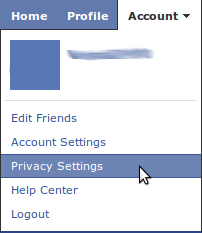
  • Click on Accounts -> Privacy Settings at top right corner 

open facebook privacy settings

  • On following page, click on 'Edit your settings' under Apps and Settings at the bottom left corner

o-pen website and app settings

  • The following page will display the number of Apps you use. Click 'Remove' unwanted and spammy apps

remove apps

  • The following page shows all the apps that have access to your personal information.
  • To remove an app directly click the 'x' in front of that application

remove particular app

  • To tweak privacy settings for a particular application, click on 'Edit Settings' in front of the application.

tweak application setting

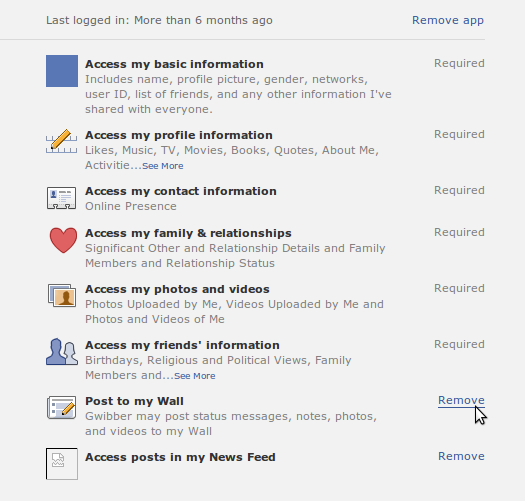
  • The interface will expand as shown below and you can tweak access as necessary.

tweak application privacy setting


Congrats you have just avoided misuse of your facebook account.